


If you’ve been managing systems since the days of AT&T Unix System V Release 3 (SVR3), you remember when networking was a manual affair. Name resolution often meant a massive, hand-curated /etc/hosts file and a prayer.
As the Domain Name System (DNS) matured, the standard consolidated around a single, universally understood text file: /etc/resolv.conf. For decades, that file served us well. But the requirements of modern, dynamic networking, involving laptops hopping Wi-Fi SSIDs, complex VPN split-tunnels, and DNSSEC validation, forced a massive architectural shift in the Linux world, most notably in the form of systemd-resolved.
Let’s walk through history, with hands-on examples, to see how we got here.
AT&T SVR3: The Pre-DNS Era
Released around 1987-88, SVR3 was still rooted in the hosts file model. The networking stacks were primitive, and TCP/IP was available but not always bundled. I still remember that around 1996-97, I used to install AT&T SVR3 version 4.2 using multiple 5.25-inch DSDD floppy disks, then, after installation, use another set of disks to install the TCP/IP stack. DNS support was not native, and we relied on /etc/hosts for hostname resolution. By SVR3.2, AT&T started shipping optional resolver libraries, but these were not standardized.
# Example /etc/hosts file on SVR3
127.0.0.1 localhost
192.168.1.10 svr3box svr3box.local
If DNS libraries were installed, /etc/resolv.conf could be used:
# /etc/resolv.conf available when DNS libraries were installed
nameserver 192.168.1.1
domain corp.example.com
dig did not exists then, and we used to use nslookup.
nslookup svr3box
Server:  192.168.1.1
Address: 192.168.1.1#53

Name:    svr3box.corp.example.com
Address: 192.168.1.10
Solaris Bridging Classical and Modern
When I was introduced to Sun Solaris around 2003-2005, I realized that DNS resolution was very well structured (at least compared to the SVR3 systems I had worked on earlier). Mostly, I remember working on Solaris 8 (with a few older SunOS 5.x systems). These systems required both /etc/resolv.conf and /etc/nsswitch.conf
# /etc/nsswitch.conf
hosts: files dns nis
This /etc/nsswitch.conf had only the job of instructing the libc C library to look in /etc/hosts, then DNS, and then NIS. Of course, you can change the sequence.
The /etc/resolv.conf defined the nameservers –
nameserver 8.8.8.8
nameserver 1.1.1.1
search corp.example.com
Solaris 11 introduced SMF (Service Management Facility), and this allowed the /etc/resolv.conf to auto-generate based on the SMF profile. Manual edits were discouraged, and we were learning to use:
svccfg -s dns/client setprop config/nameserver=8.8.8.8
svcadm refresh dns/client
For me, this marked the shift from text files to managed services, although I did not work much on these systems.
BSD Unix: Conservatism and Security
The BSD philosophy is simplicity, transparency and security-first.
FreeBSD and NetBSD still rely on /etc/resolv.conf file and the dhclient update the file automatically. This helps in very straightforward debugging.
cat /etc/resolv.conf
nameserver 192.168.1.2

nslookup freebsd.org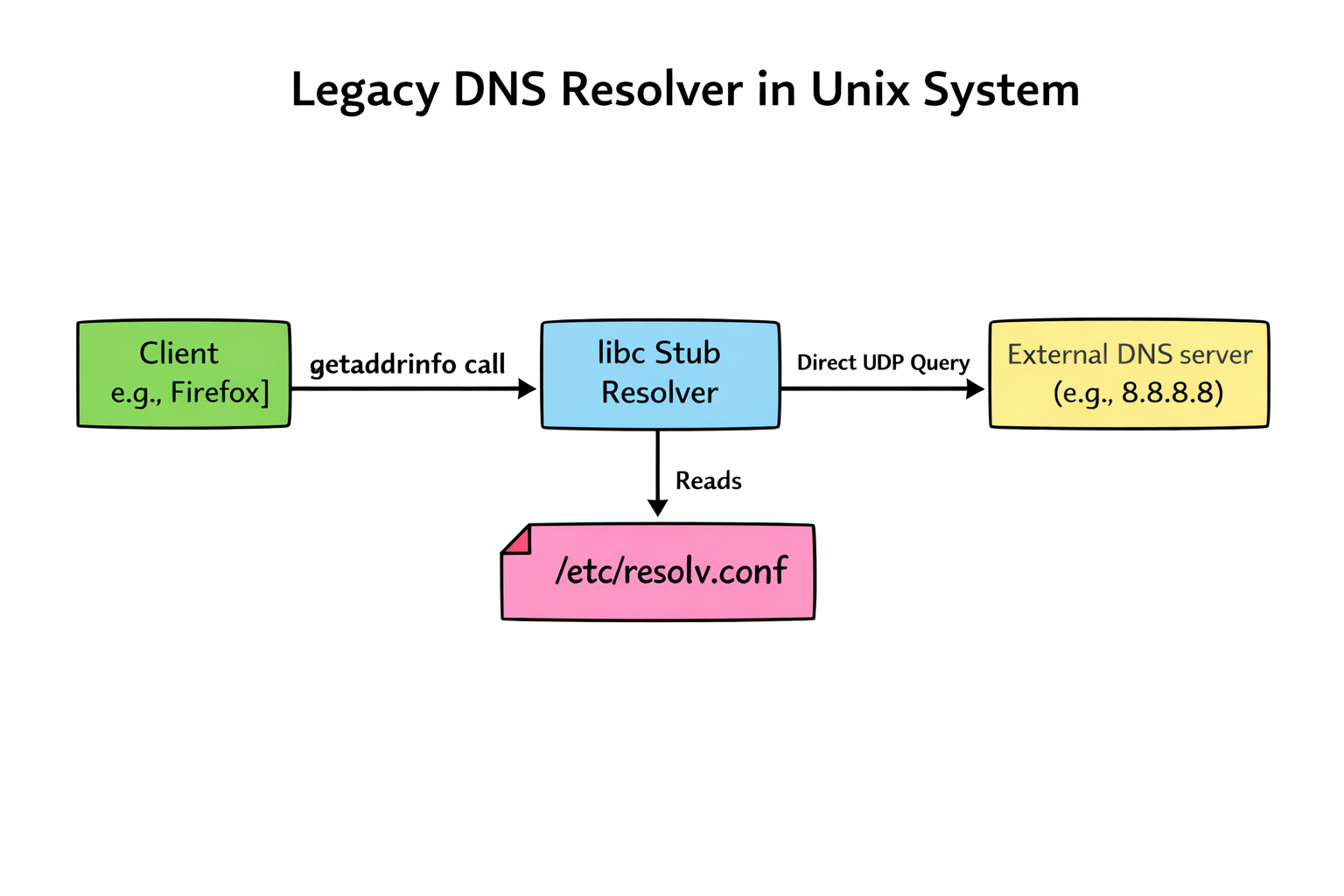
OpenBSD, famous for its “secure by default” stance, includes modern, secure DNS software like unbound in its base installation; its default system resolution behavior remains classical. Unless the OS is explicitly configured to use a local caching daemon, applications on a fresh OpenBSD install still read /etc/resolv.conf and talk directly to external servers. They prioritize a simple, auditable baseline over complex automated magic.
The Modern Linux Shift
On modern Linux distributions (Ubuntu 18.04+, Fedora, RHEL 8+, etc.), the old way of simply “echoing” a nameserver into a static /etc/resolv.conf file is effectively dead. The reason for this is that the old model couldn’t handle race conditions. If NetworkManager, a VPN client, and a DHCP client all tried to write to that single file at the same time, the last one to write won.
In modern linux systems, systemd-resolved acts as a local middleman, a DNS broker that manages configurations from different sources dynamically. The /etc/resolv.conf file is no longer a real file; it’s usually a symbolic link pointing to a file managed by systemd that directs local traffic to a local listener on 127.0.0.53.
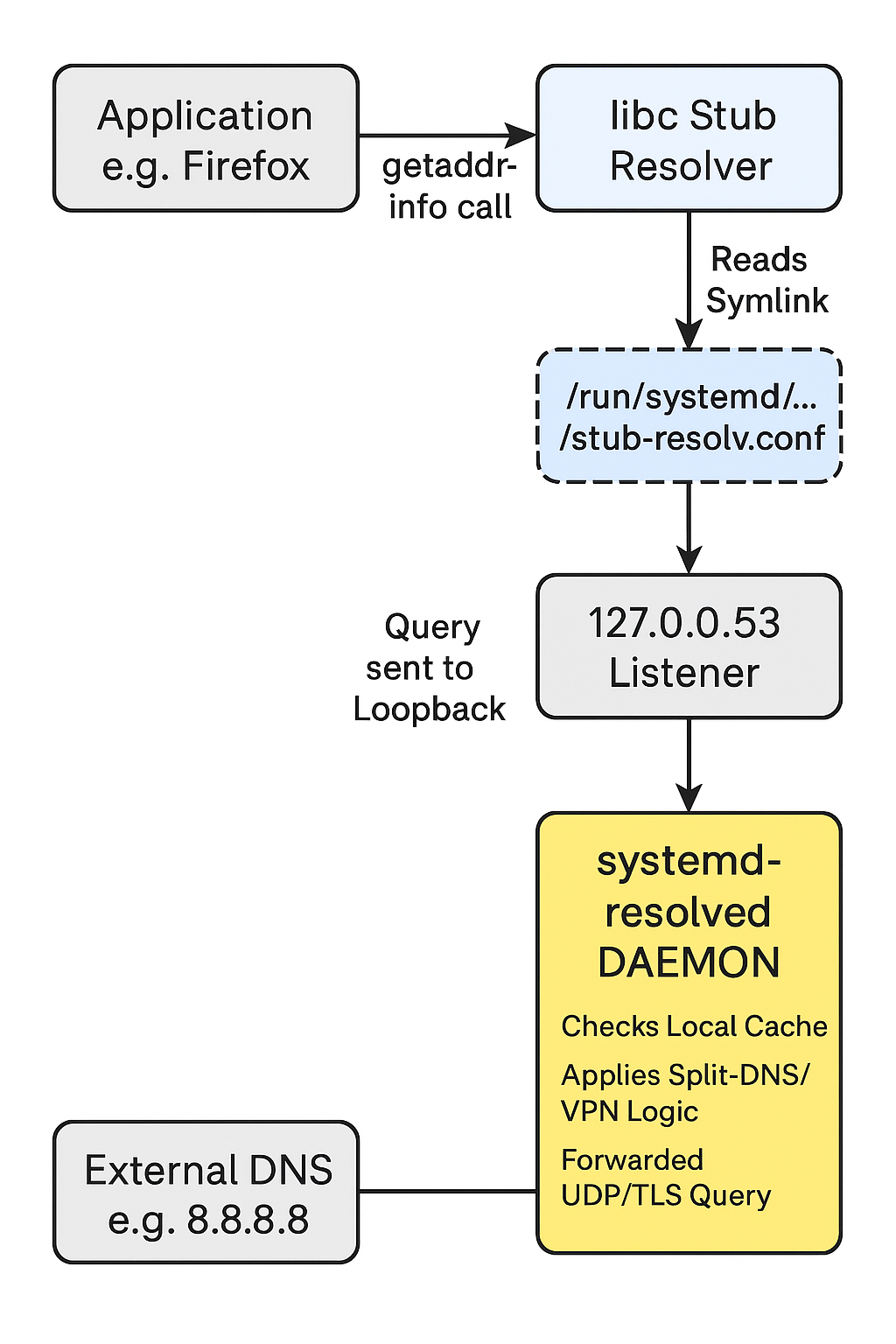
systemd-resolved adds features like –
- Split-DNS to help route VPN domains seperately.
- Local-Caching for faster repeated lookups.
- DNS-over-TLS for encrypted queries.
ls -l /etc/resolv.conf
lrwxrwxrwx 1 root root 39 Dec 24 11:00 /etc/resolv.conf -> ../run/systemd/resolve/stub-resolv.conf
This complexity buys us features needed for modern mobile computing: per-interface DNS settings, local caching to speed up browsing, and seamless VPN integration.
The modern linux systems uses dig and resolvectl for diagnostics:
$ dig @127.0.0.53 example.com

; <<>> DiG 9.16.50-Raspbian <<>> @127.0.0.53 example.com
; (1 server found)
;; global options: +cmd
;; Got answer:
;; ->>HEADER<<- opcode: QUERY, status: NOERROR, id: 17367
;; flags: qr rd ra; QUERY: 1, ANSWER: 2, AUTHORITY: 0, ADDITIONAL: 1

;; OPT PSEUDOSECTION:
; EDNS: version: 0, flags:; udp: 1232
;; QUESTION SECTION:
;example.com.                   IN      A

;; ANSWER SECTION:
example.com.            268     IN      A       104.18.27.120
example.com.            268     IN      A       104.18.26.120

;; Query time: 9 msec
;; SERVER: 127.0.0.53#53(127.0.0.53)
;; WHEN: Wed Dec 24 12:49:43 IST 2025
;; MSG SIZE  rcvd: 72

$ resolvectl query example.com
example.com: 2606:4700::6812:1b78
             2606:4700::6812:1a78
             104.18.27.120
             104.18.26.120

-- Information acquired via protocol DNS in 88.0ms.
-- Data is authenticated: no; Data was acquired via local or encrypted transport: no
-- Data from: network
Because editing the file directly no longer works reliably, we must use tools that communicate with the systemd-resolved daemon.
Suppose you want to force your primary ethernet interface (eth0) to bypass DHCP DNS and use Google’s servers temporarily:
sudo systemd-resolve --set-dns=8.8.8.8 --set-dns=8.8.4.4 --interface=eth0To check what is actually happening—seeing which DNS servers are bound to which interface scopes—run:
systemd-resolve --statusand to clear the manual overrides and go back to whatever setting DHCP provided:
sudo systemd-resolve --revert --interface=eth0We’ve come a long way from System V R3. While the simplicity of the classical text-file approach is nostalgic for those of us who grew up on it, the dynamic nature of today’s networking requires a smarter local resolver daemon. It adds complexity, but it’s the price we pay for seamless connectivity in a mobile world.